I’ll show you how to change the battery of your Kindle e-reader. You’ll see, it’s really very simple… on one condition: having the right model, that is to say the new Kindle released in 2026.
Since a picture is better than a long explanation, here is a video that shows how to open the e-reader:
Like all electronic devices, the battery of an e-reader loses battery life over time. But you have to put things into perspective: an e-reader can last at least a month on a single charge. So even if the battery loses 30% of its battery life after a few years, it’s still quite correct, especially compared to a smartphone that you charge every day. I think you can use an e-reader quite intensively for 4 or 5 years without being bothered, and even up to 7 years without having to change the battery.
Warning: this battery replacement tutorial only works on the Kindle 2026 model, which you will find a link to below.
Learn more about the Kindle e-reader
Our review of the new Kindle (click here)
Buy a Kindle e-reader
Kindle on Amazon.com (click here)
Before you get started, know that there is a small, somewhat hidden option in the e-reader’s software that lets you check the battery condition. It lets you know if your battery is working normally or if it has lost battery life, and therefore if it is worth changing it.
How to change the battery of the Kindle e-reader?
Here is how to change the battery of the Kindle 2026 step by step:
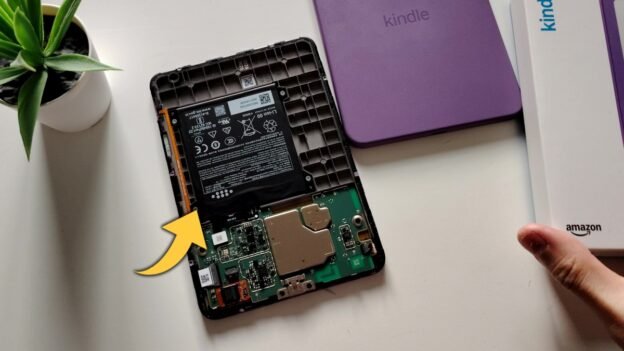
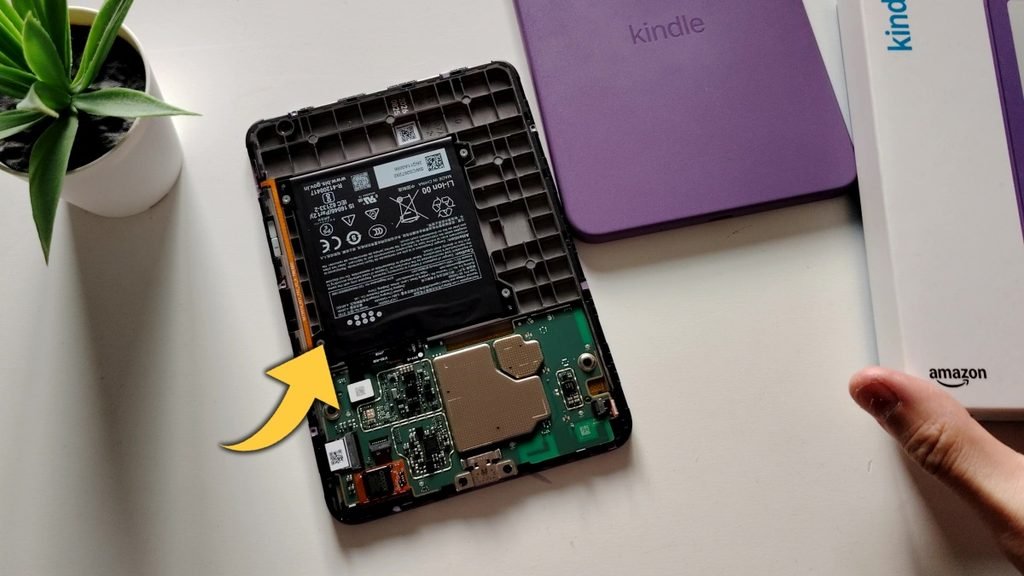
- Open the e-reader: you just need to unclip the back of the Kindle. Honestly, I found it a little bit difficult. I first tried with a tool, then in the end I used my fingernail and it went very well. It still took me 2 to 3 minutes to open the e-reader.
- Replace the battery: once the e-reader is open, you have very easy access to the battery. You will of course need to buy a new battery, which you will find on Amazon. Make sure to take a battery compatible with this model: otherwise, the e-reader may display an incompatible battery message and limit charging.
- Close the e-reader: put the back of the case back in place, then press firmly on all sides so that the back clips back in correctly.
- Check that everything works: finally, test the on/off button. In the video, you can see that on mine, it works perfectly.